

RoboDK Post Processors define how simulation programs should be generated and formatted as robot programs for a specific vendor’s robot controller.
This RoboDK Add-in allows easy editing of a Post Processor and updating the output robot program instantly.
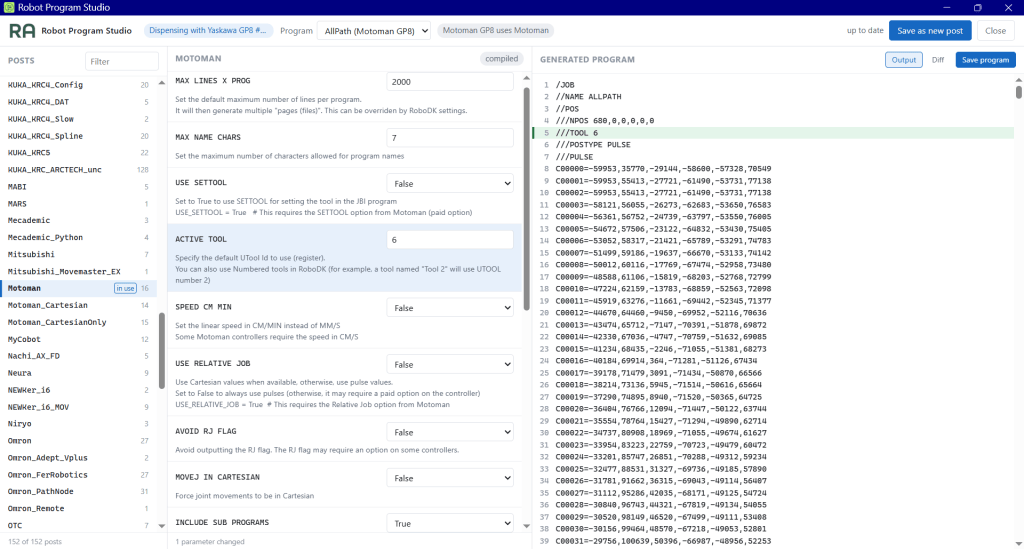
This browser-based application has three panes:
- Left: A list of available post processors as installed in the local Posts folder (usually C:\RoboDK\Posts)
- Middle: Editable parameters of the selected post processor
- Right: Output of the robot program from a selected simulation routine in the station, updates as user edits the post processor
Features:
- Edit an existing Post Processor using accessible parameters
- Save user edits as custom Post Processors
- View output of a robot program generated by a selected Post Processor
- Save a robot program in a local folder
Download the Add-in here:
Use the RoboDK Add-in Manager to install an add-in.
To get started, refer to QUICKSTART.md in the installation folder, usually at: C:\RoboDK\Addins\uk.co.robotauto.app.robotprogramstudio\RobotProgramStudio
| System | Windows |
| Version | 0.1.0 |
| Last Updated | 30 September 2026 |
You must be logged in to post a comment.